Would there be a way to preview .ps1 files
(similar to e.g. .txt files, or .reg files or image files)
Powershell scripts basically are text files.
Maybe I should modify something in Options > Advanced > preview section, but I wouldn't know what.
Thanks!
.ps1 files in preview
-
void
- Developer
- Posts: 20208
- Joined: Fri Oct 16, 2009 11:31 pm
Re: .ps1 files in preview
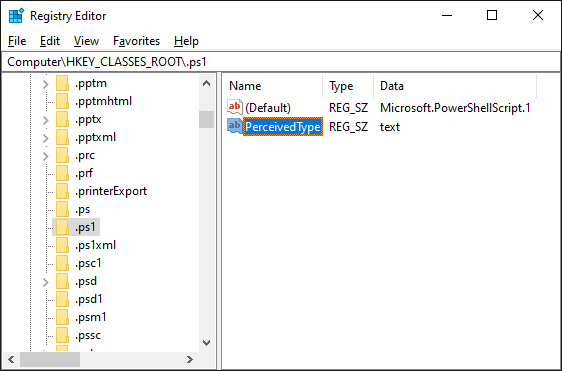
To preview ps1 files as text:
- From the Start menu, search for:
regedit - Right click Registry Editor and click Run as administrator.
- In the Registry Editor, navigate to:
HKEY_CLASSES_ROOT\.ps1 - On the right, right click and click New -> String Value.
- Change the value name to:
PerceivedType - Double click the PerceivedType value and set the data to:
text
-
eswul62
- Posts: 170
- Joined: Wed Jul 31, 2013 6:07 am
Re: .ps1 files in preview
Super!
Many thanks.
Didn't expect the solution would be a registry tweak.
Bottom line, it worked out fine.
Thanks again!
Many thanks.
Didn't expect the solution would be a registry tweak.
Bottom line, it worked out fine.
Thanks again!