Color Filters

Discussion related to "Everything" 1.5.
void
Developer
Posts: 20078
Joined: Fri Oct 16, 2009 11:31 pm

Color Filters

Post by void »

Everything 1.5 adds support for Color Filters.

Colors filters can change the result list text color for items matching a filename filter:
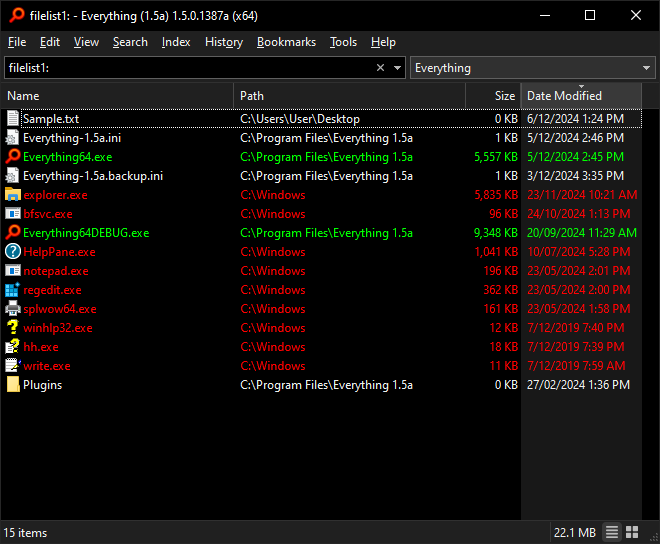

An example of colors filters being applied to the result list.
Some items appear normal and others are shown with Green or Red text.

Color filter editor:
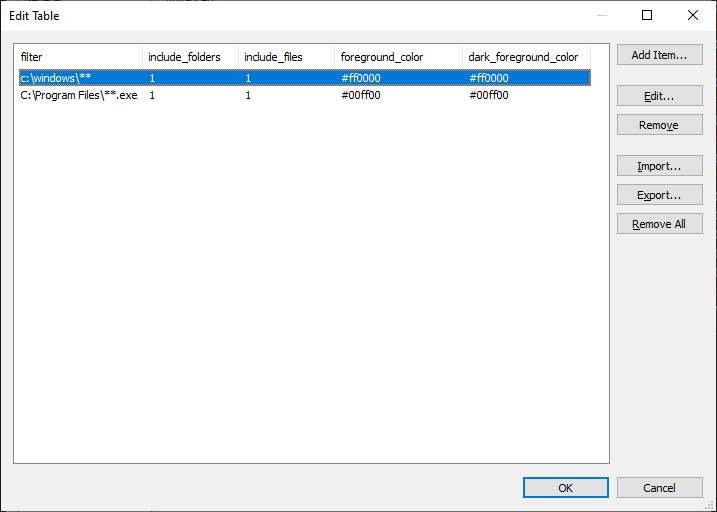
Two color filters objects:
Any file under C:\Windows as Red.
*.exe files under C:\Program Files as Green.


To add a color filter:
  • In Everything 1.5, from the Tools menu, click Options.
  • Click the Advanced tab on the left.
  • To the right of Show settings containing, search for:
    color
  • Select: color_filters
  • Click Edit....
    • In Edit Table, click Add Item....
    • Create the filename filter.
    • For example:
      *.exe
      = match files with the exe extension.
      C:\windows\*
      = match files directly in C:\Windows. (no subfolders)
      C:\windows\**
      = match files in C:\Windows. (including subfolders)
      regex:^foo
      = match files starting with foo
      C:\Program Files\Everything 1.5a\Everything64DEBUG.exe
      = match a filename exactly.
    • Set include_folders to
      1
      to match folders.
    • Set include_folders to
      0
      to ignore folders.
    • Set include_files to
      1
      to match files.
    • Set include_files to
      0
      to ignore files.
    • Set foreground_color and dark_foreground_color to
      #RRGGBB
      where RR is the Red value in hex, GG is the Green value in hex and BB is the Blue value in hex.
    • For example:
      #ff0000
      = Red
      #ffff00
      = Yellow
      #00ff00
      = Green
      #00ffff
      = Cyan
      #0000ff
      = Blue
      #ff00ff
      = Magenta
    • Click OK.
  • Click OK.


Column Colors

Column Colors can change the result list text color in each column:
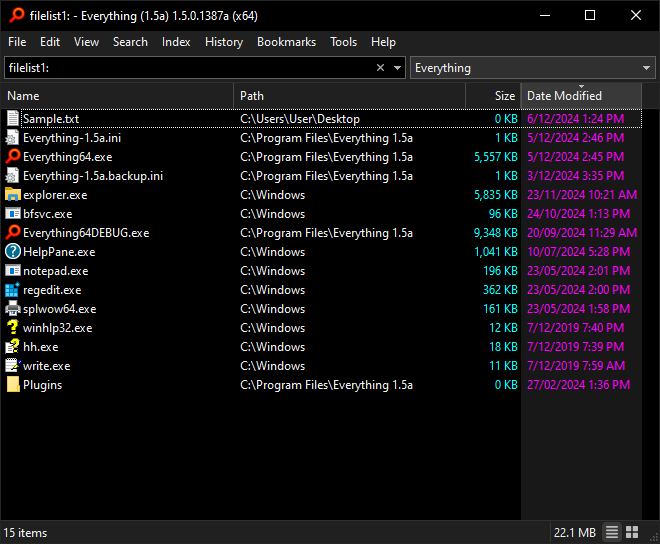

The size column is shown in Cyan.
The Date column is shown in Magenta.

Column Colors editor:
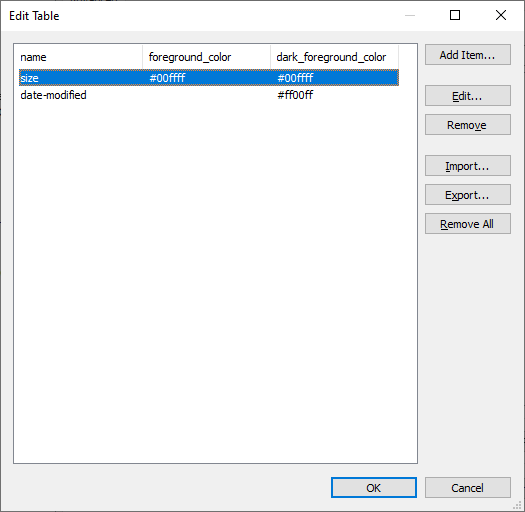
Two column color objects:
Size in Cyan and Date Modified in Magenta.


To set a column color:
  • In Everything 1.5, from the Tools menu, click Options.
  • Click the Advanced tab on the left.
  • To the right of Show settings containing, search for:
    color
  • Select: column_colors
  • Click Edit....
    • In Edit Table, click Add Item....
    • Type in a column property name. (replace spaces with
      -
      )
    • For example:
      Date-Modified

    • Set foreground_color and dark_foreground_color to
      #RRGGBB
      where RR is the Red value in hex, GG is the Green value in hex and BB is the Blue value in hex.
    • For example:
      #ff0000
      = Red
      #ffff00
      = Yellow
      #00ff00
      = Green
      #00ffff
      = Cyan
      #0000ff
      = Blue
      #ff00ff
      = Magenta
    • Click OK.
  • Click OK.
LeoLUG
Posts: 71
Joined: Tue May 26, 2020 2:28 am

Re: Color Filters

Post by LeoLUG »

Thanks for this nice addon.
one think, when everything matches the search in the results, it doesn't show it in the color - see attached
The exe became BOLD so he lost the color
You do not have the required permissions to view the files attached to this post.
void
Developer
Posts: 20078
Joined: Fri Oct 16, 2009 11:31 pm

Re: Color Filters

Post by void »

A separate setting to specify the highlight color is on my TODO list.
Thank you for the suggestion.
void
Developer
Posts: 20078
Joined: Fri Oct 16, 2009 11:31 pm

Re: Color Filters

Post by void »

Everything 1.5.0.1388a improves color filters.

[] will now be treated as an empty string.

The table editor will now let you pick colors instead of using #RRGGBB

Column colors adds the missing bold style.
Set bold to 1 to force bold text, set bold to 0 to force non-bold text.

dark_foreground_color is now: foreground_dark_color
(Both keys are valid with foreground_dark_color being favored).
abr01
Posts: 217
Joined: Tue May 01, 2018 4:57 pm

Re: Color Filters

Post by abr01 »

Very nice. Would it be possible to include a simple rule like file size? Because i would like to color code smaller MP4 files, which are mostly music files (with some extra record label or other picture content) and movie files in the MP4 format differently. Something like

<=50MB -> color code 1
>50MB -> color code 2
void
Developer
Posts: 20078
Joined: Fri Oct 16, 2009 11:31 pm

Re: Color Filters

Post by void »

Color filters currently filter by filename only.
A feature to filter by properties is on my TODO list.
Thank you for the suggestion.
abr01
Posts: 217
Joined: Tue May 01, 2018 4:57 pm

Re: Color Filters

Post by abr01 »

That's great! :idea: :arrow: :!:
mcweb
Posts: 4
Joined: Fri Nov 11, 2022 3:57 pm

Re: Color Filters

Post by mcweb »

This is great!

I wanted to point out that you can drag the order up and down to color files that are located in similar folders.
luckulucki
Posts: 78
Joined: Mon Jun 19, 2017 1:45 pm

Feature request: Regex-based partial highlighting in color filters

Post by luckulucki »

void wrote: Fri Dec 06, 2024 3:07 am Everything 1.5 adds support for Color Filters.
This is a very useful feature, thank you for implementing it.

As usual, users come up with further improvement suggestions, and I was wondering whether the following could be considered:

I would like an additional regular-expression option that determines exactly which part of a search result is highlighted.

At the moment, a matching color filter highlights the entire row. It would be useful to highlight only specific words or text fragments within the Name and/or Path column instead.

Apparently, for me, color formatting does not work here in this forum, even though the editor offers a bgcolor option. I am therefore using bold text in the following examples to represent the highlighting.

For example, the following filter highlights all .nfo files:

Code: Select all

color_filters=[{"filter":"*.nfo","include_folders":false,"include_files":true,"foreground_color":"#008000","foreground_dark_color":"#008000"}]
The current result would effectively look like this:
a filename with a special marker.nfo \\192.168.169.170\test\the\path
a filename without this marker.ext \\192.168.169.170\test\the\path
another filename without this marker.ext \\192.168.169.170\test\the\path
With an additional regex option, the user could specify that only a particular word should be highlighted:

Code: Select all

\bspecial\b
The result would then look like this:
a filename with a special marker.nfo \\192.168.169.170\test\the\path
a filename without this marker.ext \\192.168.169.170\test\the\path
another filename without this marker.ext \\192.168.169.170\test\the\path
Ideally, the user could also choose whether the regex is applied to:
  • []the Name column
    []the Path column
  • both columns
The existing filter could continue to determine which files or folders are affected, while the additional regex would determine which exact substring is highlighted.

Thank you!


EDIT: The reason I am suggesting this is that fully highlighted rows can become visually distracting when there are many matches, especially when several different colors alternate throughout the result list. At least to my old eyes. 8-)

Highlighting only the exact words or phrases I actually need would make the results appear calmer, more precise, and easier for me to scan.

It could also enable useful filters that highlight several different words or phrases in different colors within the same result row, provided the implementation of this additional feature supports multiple matching rules per row. 8-D
void
Developer
Posts: 20078
Joined: Fri Oct 16, 2009 11:31 pm

Re: Color Filters

Post by void »

Thank you for your feedback luckulucki,
I would like an additional regular-expression option that determines exactly which part of a search result is highlighted.
A custom color filter is on my TODO list to highlight matching text.
Thank you for the suggestion.


Apparently, for me, color formatting does not work here in this forum, even though the editor offers a bgcolor option. I am therefore using bold text in the following examples to represent the highlighting.

Code: Select all

[bgcolor=#00FFFF][color=#FF0000]Example[/color][/bgcolor] [bgcolor=#FF00FF][color=#00FF00]Forum[/color][/bgcolor] [bgcolor=#FFFF00][color=#0000FF]Colors[/color][/bgcolor]
Example Forum Colors

-Not sure why phpbb doesn't automatically add the trailing [/bgcolor]


With an additional regex option, the user could specify that only a particular word should be highlighted:
It's not really what you want, but just to humour you...
This can be done with the following search:

?nohighlight: highlight:regex:\bspecial\b |


Make sure
?nohighlight:
comes first in your search.
It disables highlighting by default.
highlight:regex:\bspecial\b
will highlight just special.
The trailing
|
will match anything, but only special is highlighted.

?nohighlight:
luckulucki
Posts: 78
Joined: Mon Jun 19, 2017 1:45 pm

Re: Color Filters

Post by luckulucki »

void wrote: Thu Jul 23, 2026 1:58 am A custom color filter is on my TODO list to highlight matching text.
That is great to read!

Thanks for your reply, but I don't seem to know enough to apply it correctly.
void wrote: Thu Jul 23, 2026 1:58 am It's not really what you want, but just to humour you...
This can be done with the following search:

?nohighlight: highlight:regex:\bspecial\b |


Make sure
?nohighlight:
comes first in your search.
It disables highlighting by default.
highlight:regex:\bspecial\b
will highlight just special.
The trailing
|
will match anything, but only special is highlighted.

?nohighlight:
The search_modifiers-help says, its
no-highlight:
, but I also tried
nohighlight:
to no avail.

I tried to not have the "Dokumente und Einstellungen" Folder highlighted in blue and highlight just "Files".
Unfortunately, "Dokumente und Einstellungen" is still highlighted, and "Files" is not.

There must be something I really don't understand.
2026-07-24 10-09-52_.png
Do you have any idea what I might be doing wrong?
You do not have the required permissions to view the files attached to this post.
void
Developer
Posts: 20078
Joined: Fri Oct 16, 2009 11:31 pm

Re: Color Filters

Post by void »

?nohighlight:
is the correct syntax for a global search modifier.

Looks like you have changed your operator precedence (Tools -> Options -> Search)

Please try the following search:

?nohighlight: json <highlight:regex:\bFiles\b |>


-or-

remove json:
?nohighlight: highlight:regex:\bFiles\b |