Excluding Hard Drive
-
theMezz
- Posts: 1
- Joined: Tue Apr 13, 2021 4:29 am
Excluding Hard Drive
I have 12 drives. I only want 2 indexed. How do I install everything.net so at install time it only indexes two drives and going forward never indexes any others. Please and thank you.
-
void
- Developer
- Posts: 20078
- Joined: Fri Oct 16, 2009 11:31 pm
Re: Excluding Hard Drive
To manually set which volumes are indexed when installing Everything:
- In the installer please make Automatically index fixed NTFS volumes is unchecked:
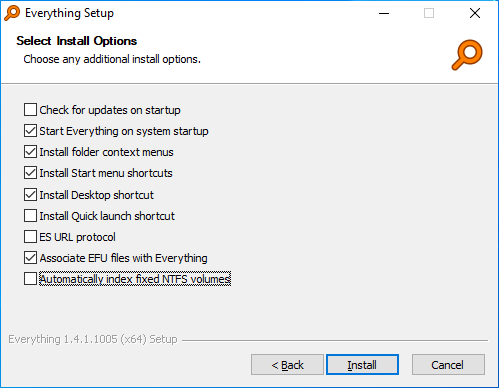
- This will install Everything with an empty index, to manually add your two drives to your index:
- In Everything, from the Tools menu, click Options.
- Click the NTFS tab on the left.
- Select a NTFS volume to include in your database and check Include in database.
- Repeat for additional NTFS volumes.
- Click OK.