Hi All
I often try to find if a file is duplicated in my HD,
I copy the name of the file, then lounch everything and paste the name of the file.
The Everything context menu is only available for Folders, would it be possible to have
it available for a file in order to find all the locations of this file ?
Thank you .
Context menu Find File
-
void
- Developer
- Posts: 20078
- Joined: Fri Oct 16, 2009 11:31 pm
Re: Context menu Find File
To add a "Search Everything" context menu item to all files:
- From the Start menu, search for:
regedit - Click Registry Editor.
- In the Registry Editor, navigate to:
HKEY_CLASSES_ROOT\* - Create a new Key called:
shell - navigate to:
HKEY_CLASSES_ROOT\*\shell - Create a new Key called:
Search Parent in Everything... - In this key, create a new String Value, set the name to:
Icon - Set the value to:
C:\Program Files\Everything\Everything.exe,0 - Create a new Key called:
command - In this key, set the (Default) value to:
"C:\Program Files\Everything\Everything.exe" -parentpath "%1" -select "%1" - Now you can right click your file and click Search Parent in Everything...
-
NotNull
- Posts: 5978
- Joined: Wed May 24, 2017 9:22 pm
Re: Context menu Find File
To find files with the same name on your system, take a look at this thread.
It was based on Everything 1.4. In the upcoming 1.5 version this is much easier to accomplish.
It was based on Everything 1.4. In the upcoming 1.5 version this is much easier to accomplish.
-
lotiara
- Posts: 18
- Joined: Tue Apr 16, 2013 5:14 am
Re: Context menu Find File
I've just installed 1.5
I don't know if I make something wrong, the menu does not appear (after a reboot)
I don't know if I make something wrong, the menu does not appear (after a reboot)
You do not have the required permissions to view the files attached to this post.
-
void
- Developer
- Posts: 20078
- Joined: Fri Oct 16, 2009 11:31 pm
Re: Context menu Find File
The * key and command key is missing, it should look more like:
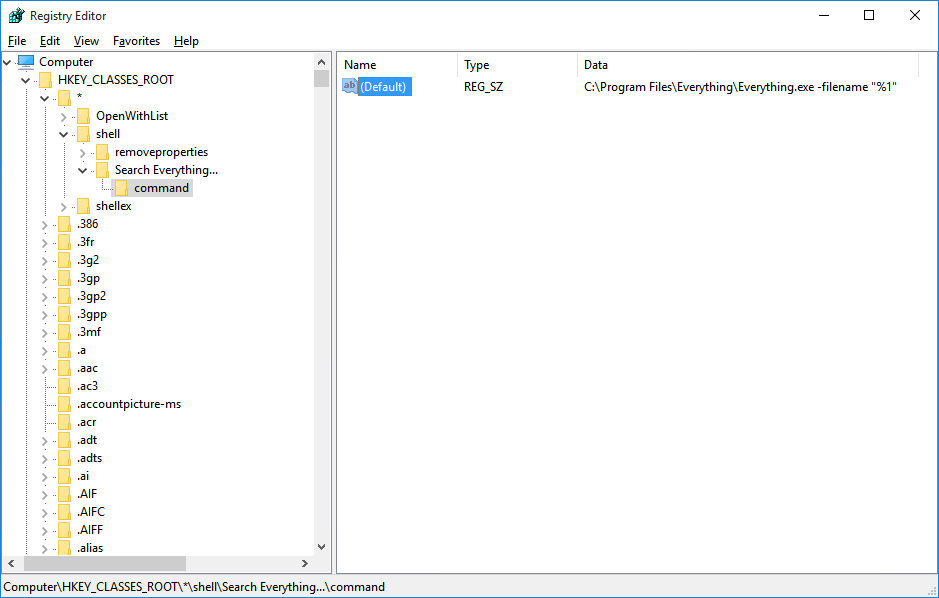
-
NotNull
- Posts: 5978
- Joined: Wed May 24, 2017 9:22 pm
Re: Context menu Find File
`You forgot to create the Command key (these 2 settings go under the Command key)
-
lotiara
- Posts: 18
- Joined: Tue Apr 16, 2013 5:14 am
Re: Context menu Find File
Wonderfull,
Works ok.
Thanks
Works ok.
Thanks
Code: Select all
Windows Registry Editor Version 5.00

[HKEY_CLASSES_ROOT\*\Shell\Everything -Where else?]
"icon"="D:\\PortableApps\\Everything\\Everything64.exe,0"

[HKEY_CLASSES_ROOT\*\Shell\Everything -Where else?\command]
@="\"d:\\PortableApps\\Everything\\Everything64.exe\" -name-part \"%1\""
Last edited by NotNull on Wed Jun 15, 2022 11:34 am, edited 1 time in total.
Reason: addded code tags
Reason: addded code tags
-
NotNull
- Posts: 5978
- Joined: Wed May 24, 2017 9:22 pm
Re: Context menu Find File
Thanks for sharing, lotiara!
FWIW: this is what I use for Everything 1.5. Using it on - for example - abc.exe will find files with that exact same name and skips 123abc.exe and abc.exe.mui
FWIW: this is what I use for Everything 1.5. Using it on - for example - abc.exe will find files with that exact same name and skips 123abc.exe and abc.exe.mui
Code: Select all
Windows Registry Editor Version 5.00

[HKEY_CURRENT_USER\SOFTWARE\Classes\*\Shell\WhereElse]
"Icon"="\"c:\\Program Files\\Everything 1.5a\\Everything64.exe\",0"
"MUIVerb"="Where Else?"

[HKEY_CURRENT_USER\SOFTWARE\Classes\*\Shell\WhereElse\Command]
@="\"c:\\Program Files\\Everything 1.5a\\Everything64.exe\" -search \" exact:#quote:#filename:\"\"\"%1\"\"\" \""